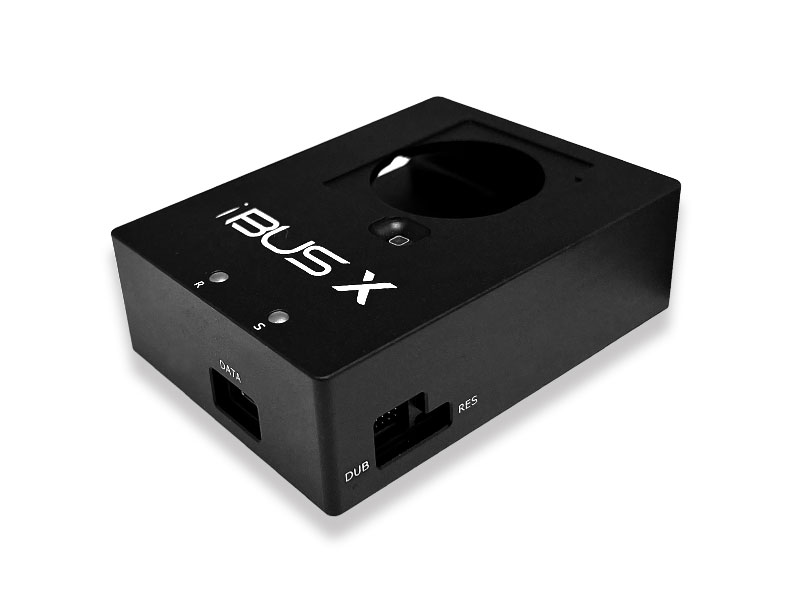
iBUS X Tool for Apple Watch S7 & S8 & S9 & S10 & S11 & Ultra and Ultra 2 & 3
$499,00 USD
10343
Buy On EOEM
iBUS X is a professional USB 2.0 hardware tool designed for Apple Watch system restore, upgrade, downgrade, and diagnostics. It provides a direct wired connection between supported Apple Watch models and a Mac computer, enabling low-level firmware operations that are not accessible through standard consumer workflows.
iBUS X is widely used by advanced users and technicians for Apple Watch recovery scenarios, including software corruption, update failures, post-repair reinitialization, and diagnostic access. For example, if an Apple Watch displays a red exclamation mark after a failed update, iBUS X can be used to restore the device without the need to contact Apple Support.
Product Information
- Supported Apple Watch Models
- Apple Watch Series 7 (41mm / 45mm, GPS & Cellular)
- Apple Watch Series 8 (41mm / 45mm, GPS & Cellular)
- Apple Watch Series 9 (41mm / 45mm, GPS & Cellular)
- Apple Watch Series 10 (42mm / 46mm, GPS & Cellular)
- Apple Watch Series 11 (42mm / 46mm, GPS & Cellular)
- Apple Watch Ultra
- Apple Watch Ultra 2
- Apple Watch Ultra 3
- Support Apple Watch firmware restore and software repair
- Support firmware upgrade and downgrade using Apple-signed firmware only
- Support Apple Watch glass digitizer and touch-related programming operations
- Support converting Apple Watch demo units to normal units (pairing is not guaranteed on some models due to hardware differences)
- Support Apple Watch diagnostic and system-level access
Extended Software Capabilities (MFC macOS V4.3.1 and Later)
When activated and used with MFC macOS V4.3.1 or later, iBUS X is not only a hardware interface tool, but also functions as a high-level authorization module within the MFC software ecosystem.
- Parallel Device Operations
Enables parallel restore and recovery workflows in supported scenarios, improving efficiency when managing multiple devices in professional environments.
- Advanced Task Management
Unlocks task-based operation control within MFC, allowing users to monitor, manage, and track restore and repair processes with improved stability and visibility.
- Enhanced Firmware Workflow Control
Provides extended control over restore, upgrade, and downgrade workflows using Apple-signed firmware, including clearer error isolation and structured operation logging.
- Professional Use Authorization
iBUS X serves as a permission key for advanced features designed for technicians, laboratories, and advanced users, beyond standard consumer-level operations.
These extended capabilities are software-dependent and require an activated iBUS X device together with a compatible version of MFC macOS software. Feature availability may vary depending on device model and firmware version.
Software Requirements
- macOS with iTunes version 12.7 or later (required for IPSW-based firmware operations)
- Compatible with MFC macOS Software (Paid software, not free)
Apple Watch Firmware Notice (Very Important)
- We do NOT provide firmware files for Apple Watch Series 7 / 8 / 9 / 10 / 11 / Ultra / Ultra 2 / Ultra 3. Before purchasing iBUS X, you must ensure that you already have access to the correct and compatible Apple-signed firmware.
- If the required firmware is not available, the Apple Watch cannot be restored, upgraded, or downgraded using iBUS X.
- Refunds will NOT be accepted due to missing or unavailable firmware.
- If using firmware obtained from mfcbox.com (when available), you must ensure that you have the legal right to use such firmware. Compatibility with iTunes is not guaranteed.
Important Notes
- Apple Watch OTA files cannot be restored using any third-party tool. Wired firmware restore requires proper IPSW files and supported software. If you are not familiar with Apple Watch firmware workflows, please do not purchase this product.
- This tool is intended for personal study, research, and technical use only. Any illegal or unauthorized use is strictly prohibited, and the user assumes full responsibility.
- Products purchased from unauthorized resellers or websites will not receive technical support. The limited warranty period is 60 days after iBUS X activation on mfcbox.com.
- If the Apple Watch is correctly detected by iTunes or MFC software and matches the supported models listed above, refunds will not be accepted for other reasons.
How to Use iBUS X
DFU & Recovery Mode Instructions
- Enter DFU Mode
- Press and hold both the Digital Crown and Side Button
- Wait for the screen to shut down and continue holding for 3 seconds
- Release the Side Button and keep holding the Digital Crown for 10 seconds
- Enter Recovery Mode
- Press and hold both the Digital Crown and Side Button
- Wait for the screen to shut down and keep holding for 3 seconds
- Release both buttons, then immediately hold the Digital Crown for 10 seconds
Package Contents
- 1 × iBUS X Tool
- 1 × USB Data Cable
Support Forum
In Stock
Buy On EOEM