
Major Upgrade to App Management: App Store Online Search, Direct Installation, and IPA Download
In this latest update, the device management tool has received a comprehensive upgrade to its Apps module, introducing brand-new capabilities for App Store online searching, one-click installation, and direct IPA file extraction and downloading.
Previously, managing iOS applications required users to source .ipa installation files from third-party platforms or web browsers before manually importing and installing them—a process both tedious and unintuitive. The new App Management feature removes these hurdles by seamlessly integrating App Store online searching with local device management, significantly boosting application acquisition and maintenance efficiency.
Key Feature Highlights
1. App Store Online Search & Auto-Matching
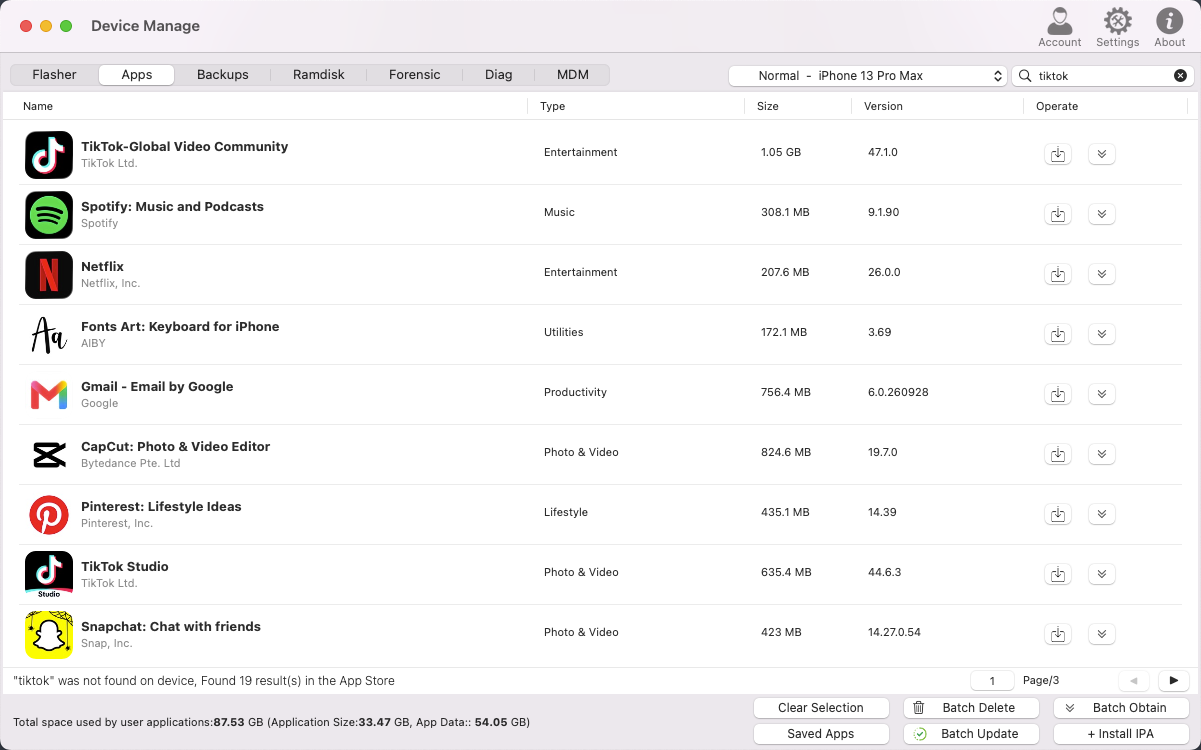
Simply enter an app name in the top-right search box (for example, searching for "tiktok"). The system will not only query installed applications on the connected device, but if the app is not found locally, it will automatically search the App Store database online and present a rich list of relevant applications—including app name, developer, category, package size, and the latest version number.
2. Seamless Online Installation & IPA File Extraction
Actionable controls are provided on the right side of each application in the search results:
- One-Click Online Installation: Download and install selected applications directly onto your connected iOS device.
- IPA File Extraction (Batch Obtain / Download): Download full .ipa installation packages directly to your local computer. This feature is especially practical for maintenance personnel and developers who require application backups, offline installation, or data analysis.
3. Comprehensive App Overview & Storage Visualization
On the main installed applications interface, the system clearly displays detailed information for all types of apps, including application type (User/System), storage consumption (app size vs. app data size), and version update prompts. Additionally, the bottom bar provides real-time statistics showing total user apps, system apps, and detailed storage allocation.
4. Advanced Batch Management & Local IPA Deployment
A suite of batch maintenance tools is integrated into the bottom menu to meet diverse device management needs:
- Batch Update & Batch Delete: Check for app updates or uninstall unwanted software in bulk with a single click, saving significant management time.
- Local IPA Installation (+ Install IPA): Retains robust local deployment capabilities, allowing you to select and install local .ipa files directly onto your device.
- Saved Apps Management (Saved Apps): Conveniently view and manage all extracted or cached offline application packages in one centralized location.
Summary
By integrating direct App Store searching, quick installation, and IPA file extraction, the upgraded App Management module delivers a complete end-to-end experience: search, download, install, and manage—all in one place. Whether for everyday device software maintenance or professional technical operations, users can now enjoy a smoother and more efficient workflow.